

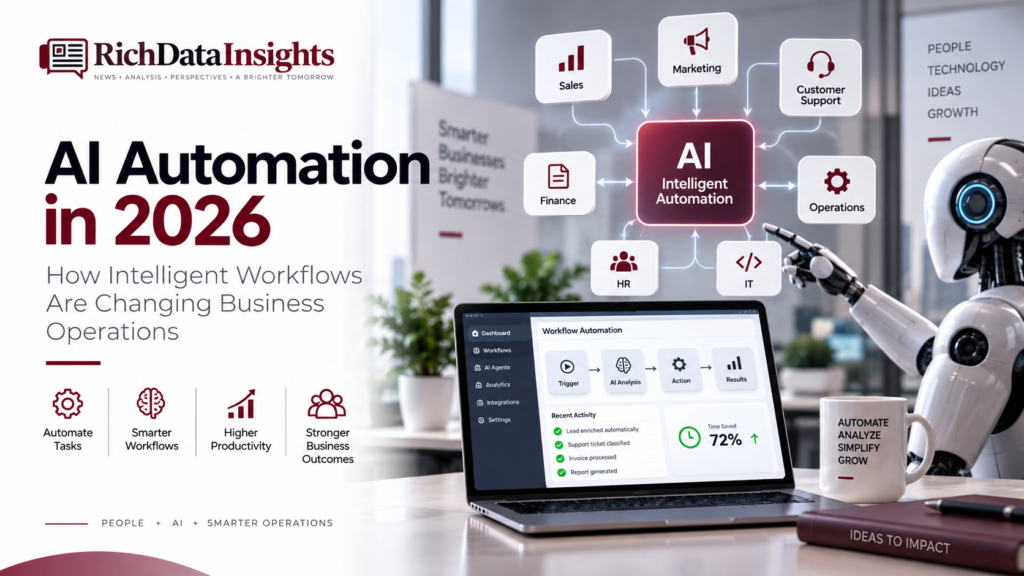
AI Automation in 2026: How Intelligent Workflows Are Changing Business Operations
Table of Contents
Artificial intelligence is no longer limited to chatbots, isolated software features or experimental projects. It is becoming part of the way businesses manage information, coordinate teams and complete everyday work.
Traditional automation was designed for predictable instructions. A form submission could create a CRM record. An approved invoice could trigger a notification. A customer order could update an inventory system.
Those workflows remain useful. But modern AI systems can work with information that is less structured. They can classify requests, summarize documents, identify patterns, recommend next steps and help coordinate activity across several applications.
That is why AI automation in 2026 is becoming less about replacing individual tasks and more about redesigning complete workflows.
The strongest implementations will not remove people from every decision. They will combine automated execution with human judgment, clear permissions and reliable data.
Key Takeaways
- AI automation is moving from simple rule-based triggers toward context-aware workflows.
- AI agents can coordinate multiple steps, but they need clear boundaries and permissions.
- Sales, marketing, support, finance, operations and IT teams can all benefit from supervised automation.
- Data quality, security, privacy and system integration are essential foundations.
- Businesses should begin with a measurable problem instead of trying to automate everything at once.
What AI Automation Means in 2026
AI automation combines traditional workflow software with artificial intelligence.
A traditional workflow usually follows a defined condition:
- When a form is submitted, create a customer record.
- When an invoice is approved, notify the finance team.
- When a lead reaches a score, assign it to sales.
- When an order ships, send a confirmation message.
These workflows are effective when the input and outcome are easy to define.
AI adds the ability to interpret less structured information. It may read an email, understand a support request, extract information from a document or summarize a customer conversation before deciding which approved process should happen next.
This does not mean an AI system should be allowed to make every decision independently. In a reliable business environment, AI should operate within a designed system of rules, permissions and review points.
The purpose is to reduce unnecessary manual effort while keeping important decisions visible and controlled.
From Rule-Based Automation to Intelligent Workflows
The difference between simple automation and intelligent workflow design is not only the technology. It is the type of work being supported.
Rule-based automation is strongest when the process is repetitive and predictable. Intelligent workflows become useful when a process contains large amounts of information, changing conditions or repeated judgment calls.
Consider a sales inquiry. A basic automation may send the inquiry to a salesperson.
A more advanced workflow could:
- Read the message.
- Identify the buyer’s request.
- Extract important requirements.
- Match the request against qualification rules.
- Retrieve approved company information.
- Highlight missing details.
- Recommend a priority.
- Create a CRM task.
- Prepare a short briefing for the salesperson.
The salesperson still handles the relationship and important conversation. The workflow simply reduces the preparation required before that conversation.
This is the practical direction of AI automation: fewer disconnected actions and more coordinated support across the full process.
A Practical Maturity Model for AI Automation
Businesses do not need to jump directly to fully autonomous systems. A staged approach is usually safer and easier to measure.
| Stage | What the system does | Human role |
|---|---|---|
| Assist | Summarizes, extracts and organizes information | Reviews the output |
| Recommend | Suggests a classification, priority or next step | Approves or rejects the recommendation |
| Execute | Performs low-risk actions using approved rules | Monitors exceptions |
| Orchestrate | Coordinates several systems and workflow steps | Governs the process and handles escalation |
Most organizations should begin with assistance and recommendations. Once the workflow is reliable, selected low-risk actions can be automated.
This gradual model makes it easier to identify errors before they affect customers, financial records or important business systems.
AI Agents Are Expanding the Role of Automation
An AI assistant usually responds to a request. An AI agent is designed to work toward a defined objective using approved tools and steps.
For example, an assistant might answer a question about a customer account. An agent-based workflow could retrieve the account record, review recent activity, identify an unresolved issue and prepare a recommended action.
Agents may also interact with software systems when they have the required permissions.
That creates opportunities for multi-step processes, but it also creates new responsibilities. Businesses must define:
- which information the agent can access
- which applications it can use
- which actions it can perform
- which actions require approval
- how uncertainty should be handled
- what happens when a connected system fails
An agent should not be given broad access simply because it is technically possible. Its authority should match the specific task it is expected to complete.
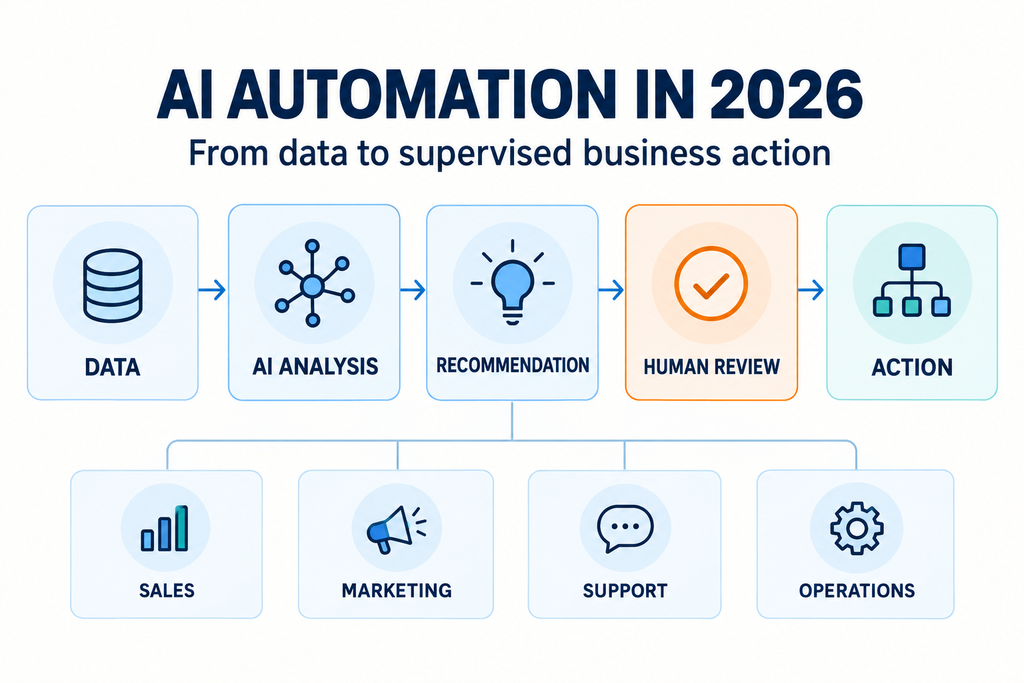
Human Oversight Is Part of the Design
Human review should not be added only after an automation problem occurs. It should be designed into the workflow from the beginning.
A low-risk action, such as summarizing an internal document, may not require approval every time.
A medium-risk action, such as changing a CRM classification or preparing a customer response, may require a review step.
A high-risk action, such as approving a payment, deleting a record or changing a security setting, should normally remain under stronger human control.
The right balance depends on the business process. The important point is that automation should make responsibility clear.
Employees should be able to see what the system recommended, what information it used and what action was taken. Clear logs and review points help teams investigate mistakes and improve the workflow over time.
Sales and Revenue Operations
Sales teams often spend substantial time preparing information instead of speaking with customers.
They may research companies, update CRM records, review previous conversations, prepare meeting notes and create follow-up tasks.
AI automation can assist with these activities by:
- preparing account summaries
- identifying missing CRM information
- organizing recent engagement
- highlighting changes in an account
- preparing call notes
- suggesting follow-up tasks
- routing new inquiries to the appropriate team
The value is not in making sales conversations impersonal. It is in giving sales professionals better context before the conversation begins.
AI-assisted research is also changing the buyer side of the process. Our analysis of B2B buying trends in 2026 explains how buyers are researching vendors more independently before contacting sales teams.
Marketing Workflows Are Becoming More Intelligent
Marketing departments manage a large amount of connected activity. They work with audiences, campaign data, email programs, website behavior, advertising platforms and performance reports.
Automation already helps teams schedule campaigns and move information between platforms. AI can support the interpretation of that information.
Marketing teams may use intelligent workflows to:
- group audience records
- summarize customer feedback
- identify content opportunities
- compare campaign performance
- prepare recurring reports
- detect unusual changes in engagement
- identify accounts that may need attention
- adapt communication based on approved audience rules
The goal should not be to increase the volume of communication without limit. Poorly controlled automation can create irrelevant messages and reduce trust.
A better approach is to use AI to help marketers understand what is happening and decide where human attention is most valuable.
Customer Support and Service Operations
Customer-support teams deal with a mixture of repetitive questions, detailed technical issues and emotionally sensitive situations.
AI automation can help organize this work before it reaches a support representative.
A workflow may:
- classify the request
- identify the customer
- retrieve relevant account information
- search approved support documentation
- prepare a response suggestion
- identify urgency
- route the request to the correct team
Simple requests may be resolved automatically when the information is clear and the risk is low. Complex or sensitive matters should be transferred to a person with the right authority.
The benefit is not only faster response time. A support representative can begin with more context instead of asking the customer to repeat information that has already been provided.
Finance and Document-Based Processes
Finance departments work with invoices, approvals, expenses, reports and compliance records. Many of these processes contain repetitive document and data-entry tasks.
AI-assisted workflows can help extract information from documents, compare fields against existing records and identify unusual entries.
For example, an invoice workflow may:
- Extract the supplier and payment information.
- Compare the invoice against an approved purchase record.
- Check for missing or inconsistent fields.
- Continue when the information matches expected rules.
- Send exceptions to a finance employee.
This can reduce manual processing, but sensitive financial actions require strong approval controls.
A workflow may prepare a payment for review, but that does not mean it should automatically approve or release the payment. Automation should improve financial control rather than bypass it.
Operations Teams Can Detect Problems Earlier
Operational teams monitor orders, suppliers, inventory, requests and service levels. Problems may remain hidden when employees must manually review every transaction or dashboard.
Intelligent workflows can help identify events that deserve attention, such as:
- repeated delivery delays
- low inventory levels
- unresolved internal requests
- supplier performance changes
- unusual processing times
- service-level risks
- customer issues that have remained open too long
The system can notify the right person and provide the surrounding context.
This changes the role of automation. Instead of simply completing a task after an event occurs, a workflow can help an organization recognize a developing problem earlier.
Technology and Software Development
Technology teams are using AI to support development, documentation, testing and IT operations.
Developers may use AI to explain unfamiliar code, prepare test cases, generate documentation or investigate possible defects.
IT teams may use workflows to classify support tickets, summarize incidents and suggest troubleshooting steps.
These tools can improve productivity, but technical review remains necessary. AI-generated code, infrastructure changes and security configurations should be tested before they are introduced into important environments.
Speed is valuable only when reliability is protected.
Data Quality Is the Foundation
AI automation is only as reliable as the information available to it.
A workflow that receives inaccurate customer data may make an incorrect recommendation. Duplicate records may trigger repeated communication. Outdated job titles may cause a sales process to contact the wrong person.
As automation expands, organizations need stronger data-management processes, including:
- field validation
- duplicate removal
- consistent naming standards
- controlled updates
- source monitoring
- access management
- retention rules
- audit history
The purpose is not to make every record perfect. It is to ensure that the information used for important decisions is reliable enough for the task.
Poor information can be processed very quickly by automation. That does not make the result correct.
Integration Connects the Workflow
Most companies use several business applications. Customer information may live in a CRM, campaign information in a marketing platform, support records in a service system and financial information in a separate application.
The value of intelligent automation often appears when those systems can work together.
A new opportunity might update the CRM, notify a collaboration channel, change an account status and begin tracking a relevant business event.
Integration reduces manual handoffs and helps different teams work from more consistent information.
However, integration should not mean giving every system access to everything. Each connection should have a clear purpose and a defined permission scope.
Security, Privacy and Permissions
As AI systems gain access to more tools, security becomes part of workflow design.
An automation that summarizes customer information may need read access to selected CRM records. It probably does not need permission to delete accounts or modify billing details.
A finance workflow that prepares a document may not need authority to approve a payment.
Permissions should be limited to what the workflow genuinely requires. Important actions should be logged so that the organization can understand what happened and when.
Businesses should also consider how information is stored, transferred and removed. The NIST AI Risk Management Framework provides a useful reference for thinking about AI-related risks and controls. The NIST Generative AI Profile provides additional guidance for generative AI risks.
Privacy should be considered separately from general security. The NIST Privacy Framework can help organizations think about how personal information is identified, managed and protected.
Every Workflow Needs an Escalation Path
No workflow will understand every situation correctly.
A request may be unclear. A data source may be unavailable. Two systems may contain conflicting information. An AI model may not have enough confidence to make a recommendation.
Reliable automation should know when to stop.
The system should be able to:
- identify uncertainty
- preserve the original request
- explain the reason for escalation
- send the issue to the correct person
- avoid repeating the same failed action
- record the outcome for later review
A workflow that asks for human help at the right moment is more dependable than one that confidently produces an unsupported answer.
Measuring the Business Value
Time savings are an important measure, but they should not be the only measure.
Businesses should also examine:
- response time
- error rates
- data consistency
- processing duration
- customer satisfaction
- employee productivity
- workflow visibility
- approval delays
- compliance performance
An automation that saves an hour but creates additional errors is not delivering real value.
The strongest measurement approach compares the process before and after automation. It should examine both efficiency and reliability.
Employees Need a Clear Operating Model
Technology does not create successful automation by itself.
Employees need to understand what the system does, what information it uses and when they are expected to intervene.
Before launching a workflow, teams should define:
- which activities are automated
- which decisions remain with employees
- when approval is required
- how errors should be reported
- who owns the workflow
- how changes will be reviewed
This is especially important when automation changes a familiar job process. People are more likely to trust a system when they understand its limitations and their own responsibilities.
Start With a Real Business Problem
One common mistake is trying to automate everything because AI is available.
A better starting point is a specific, measurable problem.
For example:
- Sales representatives spend too much time researching accounts.
- Support teams manually classify repetitive requests.
- Marketing teams spend hours preparing the same reports.
- Finance employees review large volumes of similar documents.
- Operations teams discover delays only after customers complain.
Once the problem is clear, the organization can determine whether AI is actually useful.
The best first workflow is not always the most impressive one. It is the one that solves a real problem with manageable risk.
Build in Stages
A practical implementation can follow this sequence:
- Document the existing process.
- Identify delays, repeated work and common errors.
- Clean the data used by the workflow.
- Automate low-risk information collection.
- Add AI summarization or classification.
- Introduce recommendations with human approval.
- Automate selected actions with clear safeguards.
- Measure the results.
- Improve the process based on real usage.
This approach gives employees time to test the system and allows the organization to identify weaknesses before expanding it.
Complex automation should be built on a process that already works clearly.
Multi-Agent Workflows May Become More Common
Businesses may increasingly use several specialized AI agents in one workflow.
One system could collect information. Another could analyze it. A third could prepare a communication. A coordinating layer could manage the sequence and check whether the next step is allowed.
This resembles the way a human team divides responsibilities between specialists.
Multi-agent workflows could help with complex operations, but they also create additional governance requirements. Organizations need to know which system performed each action, which data it used and who is responsible for the final outcome.
The more agents involved, the more important ownership, monitoring and auditability become.
How Work Responsibilities May Change
AI automation will change the way employees spend their time.
A marketer may spend less time preparing repetitive reports and more time interpreting performance.
A salesperson may spend less time collecting account information and more time building relationships.
A support representative may handle fewer routine questions and focus on complex customer problems.
A finance employee may spend less time entering document data and more time reviewing exceptions.
This does not mean every role will become fully automated. In many cases, responsibilities will shift toward judgment, communication, creativity and decision-making.
Human expertise remains valuable because business situations are often incomplete, uncertain and sensitive to context.
The Future of Intelligent Business Operations
Many current workflows react to events. Future systems may become more proactive.
An intelligent workflow might notice declining customer engagement, identify an unusual operational pattern or recognize that an important account has become more active.
It could surface that information before an employee asks for it.
This may move AI from being a tool that people open when they need help toward becoming an intelligence layer embedded across business operations.
The most effective systems will still require boundaries. Proactive does not mean uncontrolled. Businesses will need to decide which insights should be surfaced automatically, which actions require approval and which information should remain restricted.
Frequently Asked Questions
What is AI automation in 2026?
AI automation combines traditional workflow automation with artificial intelligence. It can help interpret information, summarize documents, classify requests, recommend actions and coordinate approved tasks across business systems.
How is intelligent workflow automation different from traditional automation?
Traditional automation usually follows fixed rules. Intelligent workflows can work with less structured information and help interpret context before choosing an approved next step.
Can AI automation replace human employees?
AI automation can reduce repetitive work, but it does not remove the need for human judgment. Employees remain important for complex decisions, customer relationships, exception handling, ethics and accountability.
How should a business begin using AI automation?
Start with one clear and measurable business problem. Automate low-risk steps first, test the results, add human approval where needed and expand only after the workflow is reliable.
Final Thoughts
AI automation in 2026 is changing how businesses design and manage work.
Traditional automation remains valuable, but intelligent systems can now support processes that involve interpretation, coordination and changing information.
Sales teams can receive better account context. Marketing teams can analyze activity more efficiently. Support teams can organize requests faster. Finance teams can reduce repetitive document processing. Operations teams can identify problems earlier. Technology teams can accelerate development while maintaining review.
The technology is only one part of the solution.
Successful automation also requires reliable data, connected systems, clear permissions, privacy controls, strong governance and human oversight.
The objective should not be to remove people from every workflow. It should be to use technology where it creates real value while allowing people to focus on judgment, expertise, creativity and relationships.
As intelligent workflows become more capable, the businesses that succeed will be those that combine automation with disciplined processes and responsible human decision-making.
Pingback: B2B Buying Trends in 2026 | RichDataInsights
Pingback: B2B Data Intelligence in 2026
Pingback: Global AI Regulation in 2026: What Businesses Need to Know